IP/VLAN-plan - The foundation of every network
Before building a well-organised and secure network, it's important to plan it carefully with segmentation and scalability in mind. In this article, I'll walk you through how I usually do this with an IP/VLAN-plan and which VLANs are required for a solid, fundamental network design.

Prerequisites
Before you start building a well-organised and scalable network, you first need to plan it with security, segmentation and scalability in mind. There are a few different ways of doing this, but my go-to approach is to create an IP/VLAN-plan. There are tools for doing this (such as NetBox), but in this article, I will go through how to do it in a regular spreadsheet, which in my opinion is good for beginners and more than enough for most companies.
If you are a complete beginner in networking, I would strongly suggest that you first learn the basics of IP addressing and VLANs to better understand this article. A good way for this, is to take a Cisco CCNA certificate, either the big "CCNA 200-301" or the newer "CCNA 1: Introduction to Networks" and "CCNA 2: Switching, Routing, and Wireless Essentials" certificates. If you don’t care about taking the actual (paid) exams, you can still learn the content from excellent, free resources on YouTube, such as NetworkChuck's CCNA 200-301 Complete Course and/or NetITGeek's CCNA 1 - ITN and CCNA 2 - SRWE courses.
Naming conventions
Before you continue creating your holy spreadsheet of IP addresses, it's good (and best practice) to first determine a standardised naming convention for hostnames, FQDNs and VLANs, and numbering conventions for your IP addresses and subnets.
For hostnames, I generally go with:
<site>-<rack>-<role><id>
So, for example, "dc01-core01-pve01" would be the Proxmox host (PVE) number 01 in core rack number 01 at the site DC01 (datacenter number 01). The only exception where I don't follow this convention is for hosts that can generally only exist as one, for example "dc01-core01-pve01-bmc" (since most servers only can have one IPMI or iDrac interface). This convention is both clear and easy to tell what a server is for, and good for scalability since it always predicts that everything will be scaled up both horizontally and vertically. The FQDN will then be:
<hostname>.in.<example.com>
Where "hostname" is the earlier explained "<site>-<rack>-<role><id>", ".in." stands for "internal" (for local DNS records of internal services and stuff not accessible on the internet) and "example.com" is your publicly owned domain name (needed for creating wildcard SSL certificates etc., for your internal services). The "in.<example.com>" portion of the FQDN is also the same as your network's DNS search domain.
When it comes to VLANs, it seems that everyone has different opinions on how to name them the "correct way". But I usually just go for:
vlan<id>-<description>
Where "id" is the number of the VLAN ID (highly preferred between 2 and 255, more on that later) and "description" is a short, 1-3 word long, kebab-case description of what the VLAN is for. For example, "vlan99-mgmt" (management VLAN with an ID of 99) or "vlan10-core-services" (core services VLAN with an ID of 10).
Lastly, we have the numbering convention for IP addresses and subnets. This depends very much on your needs, but I usually go with:
10.<site>.<vlan>.<host>
So, "site" describes a predetermined address space reserved for this site (for example, "10.10.x.x" for DC01, "10.20.x.x" for DC02, etc.), which is very helpful when running one big intranet across many different physical sites. Then, the "vlan" part is simply the number of the VLAN ID that this subnet belongs to, and also why I prefer to only have VLAN IDs between 2 and 255. And lastly, the "host" is just the host on the network. So, for example, "10.10.99.0/24" would be a /24 subnet on VLAN 99 at DC01, and "10.10.99.5" would be a host on VLAN 99 at DC01!
All of the above can of course be modified according to your needs. If you, for example, need a /23 subnet on the same VLAN, it will break my numbering convention for the IP addresses (for example, "10.10.20.0/23" on VLAN 20 will have the max host address of "10.10.21.254", which, according to the IP convention, is on VLAN 21). But I think that this is fine though, as long as you document it carefully in the IP/VLAN-plan.
Required VLANs
When building a well-segmented, secure and scalable network, you should segregate different kinds of services to different VLANs. The number of VLANs and what they are used for depends heavily on your specific setup, but below I will list the most common VLANs (that i use in nearly all my setups), what they are for and which ID i usually give them:
-
VLAN 1 - Default VLAN
This is the default or "native" VLAN that needs to exist in pretty much all setups. It's going to house all LAN clients that are just regular users on the network, such as your gaming computer or laptop that just needs internet access. -
VLAN 10 - Core Services
Here, all your core services will live (when running dedicated servers). Some people say that this is overkill and just adds extra strain on the inter-VLAN routing, but I think that it's good practice for security and minimising access to everything. Here, I usually run stuff like DHCP, DNS, NTP and SNMP servers, and other monitoring services. Basically, everything needed to keep the network running. -
VLAN 20 - Servers
You're most probably going to run some servers on your intranet (i.e., internal services such as file servers, Git servers, development databases and CRM systems that you should only be able to access when connected to the LAN). VLAN 20 is where they're going to live. -
VLAN 30 - DMZ
You may also have some servers that you want to be publicly accessible but still host on-prem, such as your company’s website, public API server or a public (but still on-prem hosted) collaboration platform such as Nextcloud. Then you need a DMZ ("demilitarized zone") VLAN, which basically is a VLAN that still lives on your servers, but is isolated from your internal network. -
VLAN 80 - NFS
When having multiple servers that are going to utilize the same dedicated storage server (such as a NetApp storage system), or just going to take recurring backups to a NFS share, it's a very good practice to keep this on a separate dedicated VLAN for many reasons. First of all, you can configure QoS policies which prioritize traffic for more critical VLANs, such as MGMT or Core Services, while doing heavy data transfers on the NFS VLAN such as a large backup, so the performance impact isn't noticeable elsewhere. It's also good to keep NFS clients on a closed VLAN since NFS isn't really known for being a secure protocol, meanwhile it also has access to critical storage. It's good to have an MTU of 9000 (for jumbo frames) for interfaces on this VLAN. -
VLAN 81 - vMotion
If you're going to have a VMware ESXi cluster on your network (with vCenter and HA vMotion), it's best practice to keep this on its dedicated VLAN with lower QoS prioritization (such as NFS) because of its large and frequent data transfers. And once again, an MTU of 9000 is also preferred for the interfaces on this VLAN. -
VLAN 82 - iSCSI
When using iSCSI, low latency (and security) is very important. It's therefore also good to keep it on an isolated VLAN. An MTU of 9000 on the VLAN's interfaces is also very beneficial. -
VLAN 98 - SVM MGMT
When running NetApp storage servers, you access them through an "SVM" (Storage Virtual Machine). This SVM can also have a management interface (IP address) for controlling that specific SVM (just management, not data). And since I'm running a 10Gb/s switch in my setup (that isn’t connected to my GW, i.e., the VLANs aren’t routed) for connecting my NetApp storage server to my other servers, I need a separate MGMT VLAN for the SVM other than the regular MGMT VLAN. -
VLAN 99 - MGMT
You don’t want to expose all your management interfaces to the regular LAN (or any other VLANs, for that matter), they need high security and very limited access. This is where stuff like your switches’ management interfaces, physical servers iDrac's / IPMI's, Proxmox web interface, vSphere clients etc. will live. Some of the services should have internet access (for downloading updates etc.), and some should only be allowed NTP, DNS and SNMP (to the Core Services VLAN) and have a default gateway for OOB access (i.e., via VPN).
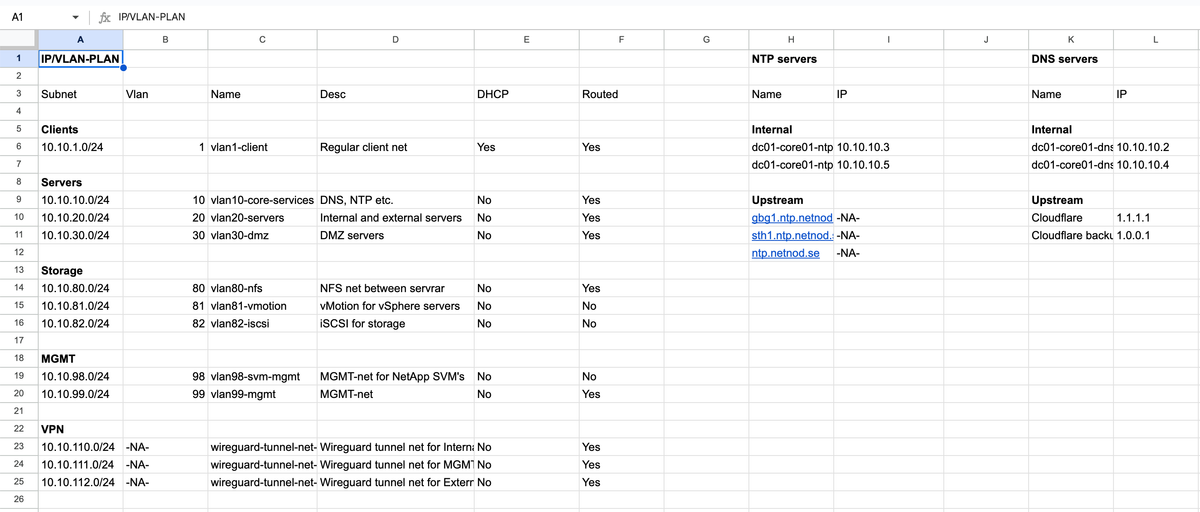
The IP/VLAN-plan spreadsheet
As I said in the beginning, I think that the easiest (and beginner-friendly) way to plan a small- to medium-sized network is through a spreadsheet. As always, there are a lot of different ways of doing it and everyone has different opinions, but I will go through how I usually do it below.
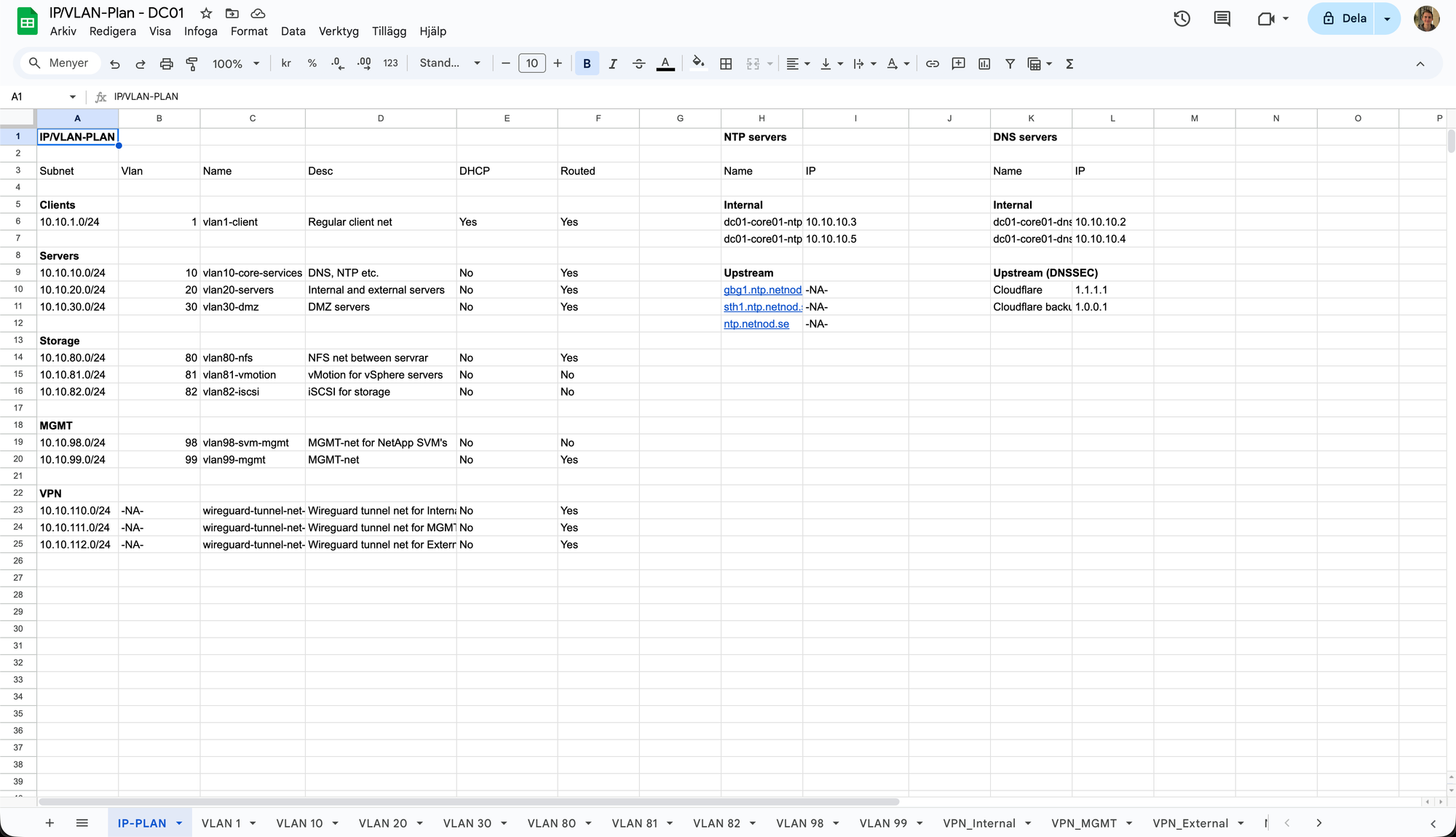
The picture above is from one of my example IP/VLAN-plan's first page. Here, every VLAN in this network (at this site) is listed and briefly explained including name, subnet, VLAN ID, description, if the VLAN has a DHCP server and if the VLAN is routed (i.e., can reach the gateway and services on other VLANs through inter-VLAN routing). Next, the local NTP and DNS servers' name and IP addresses are listed as well as the upstream sources' name and IP addresses used for the local servers. Lastly, on the bottom, you can see that there's one tab for every VLAN. I'd recommend copying this page first (if you want to use my layout as a template), and then modify it for your needs. Also, change the NTP servers to the official ones that are geographically closest to you, or if you prefer to use any specific ones (such as pool.ntp.org). Then, after you have determined which VLANs you actually need, you can start creating all the VLAN-specific tabs.
But, what should actually be in the VLAN tabs? Let's take a look at the "VLAN 10" tab!
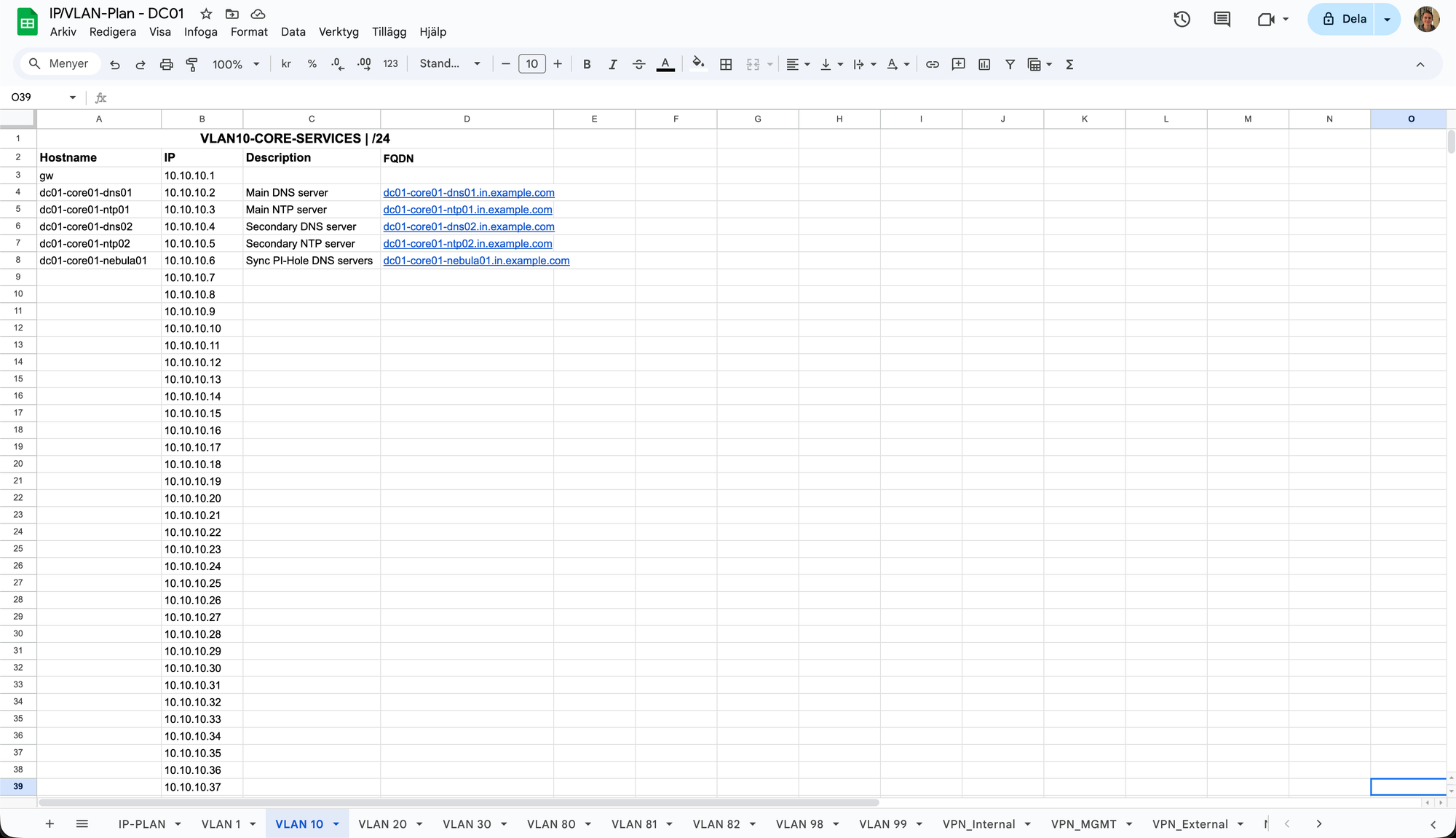
As you can see in the picture, it quite simply contains a list of all the possible IP addresses in the VLAN 10 subnet, and it's here that you are supposed to document or enter all your VLAN 10 services and reserve the specific IP address. The list contains the following fields:
- Hostname - The service or VM's hostname, i.e. "<site>-<rack>-<role><id>"
- IP - The reserved IP address for the service
- Description - A brief description what the service is for
- FQDN - The FQDN of the service, same as you put in your local DNS resolver
If we then take a look at, for example, the VLAN 99 (MGMT VLAN) tab, it looks pretty similar.
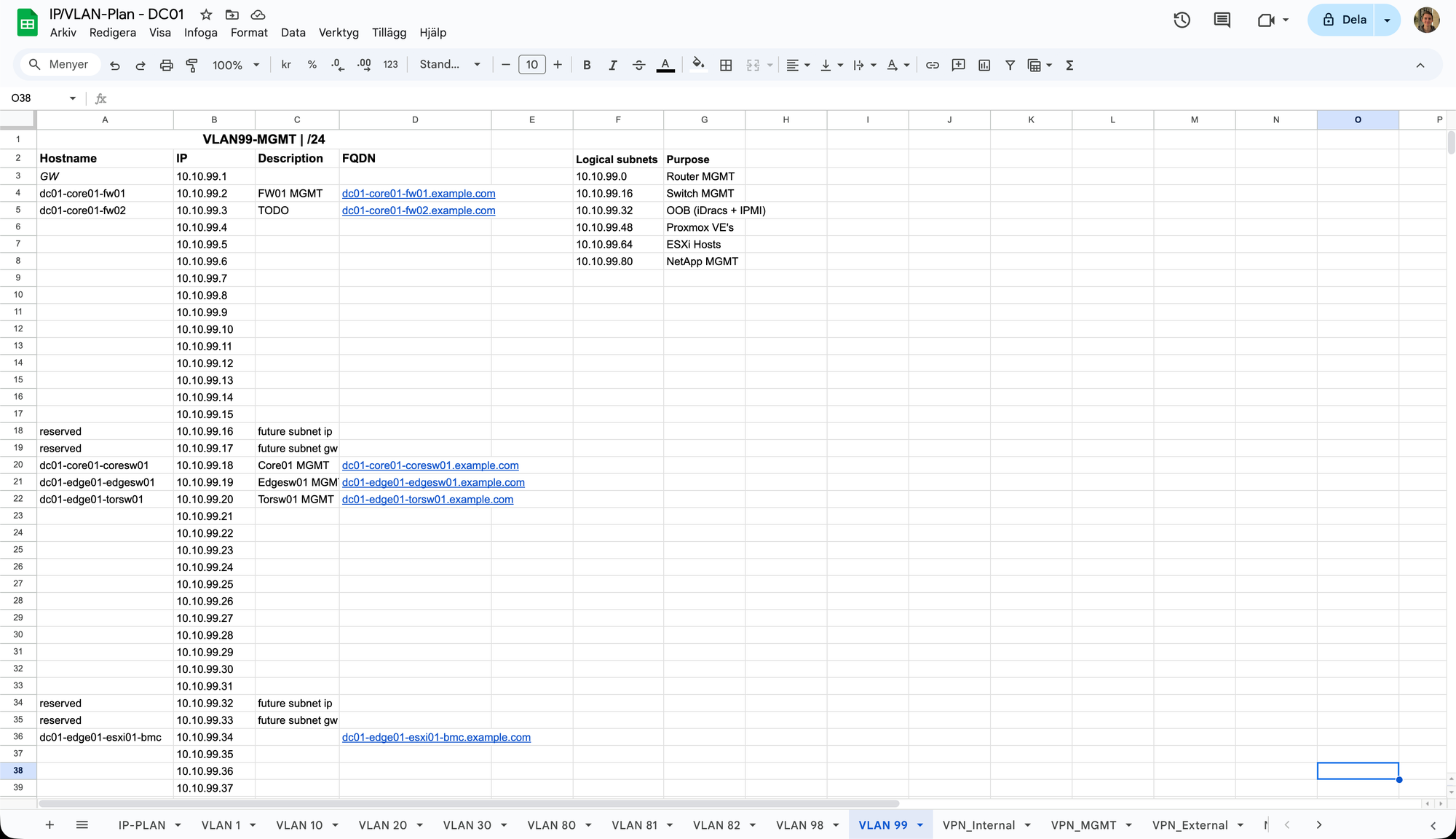
The same principles apply here but I have also created "logical subnets" inside this VLAN subnet for multiple reasons. First of all, it's a good way to organise and reserve blocks of IP addresses for different kinds of similar services. Then, you could also create different firewall rules for the logical subnets so that, for example, the OOB devices (IPMIs and iDracs) doesn't have internet access (but still can access DNS and NTP on the Core Services VLAN) meanwhile the Proxmox hosts can fetch HTTP and HTTPS from the internet for updates. And if you have a layer 3 switch, you could also later revert them to multiple real subnets with different broadcast domains for extra security (in case of for example one iDrac device gets compromised and start flooding the broadcast address with malicious traffic, it's good to minimise the blast radius).
All the other VLAN tabs look pretty much like this. But there are some tabs that are completely different, and that's the "VPN tabs".
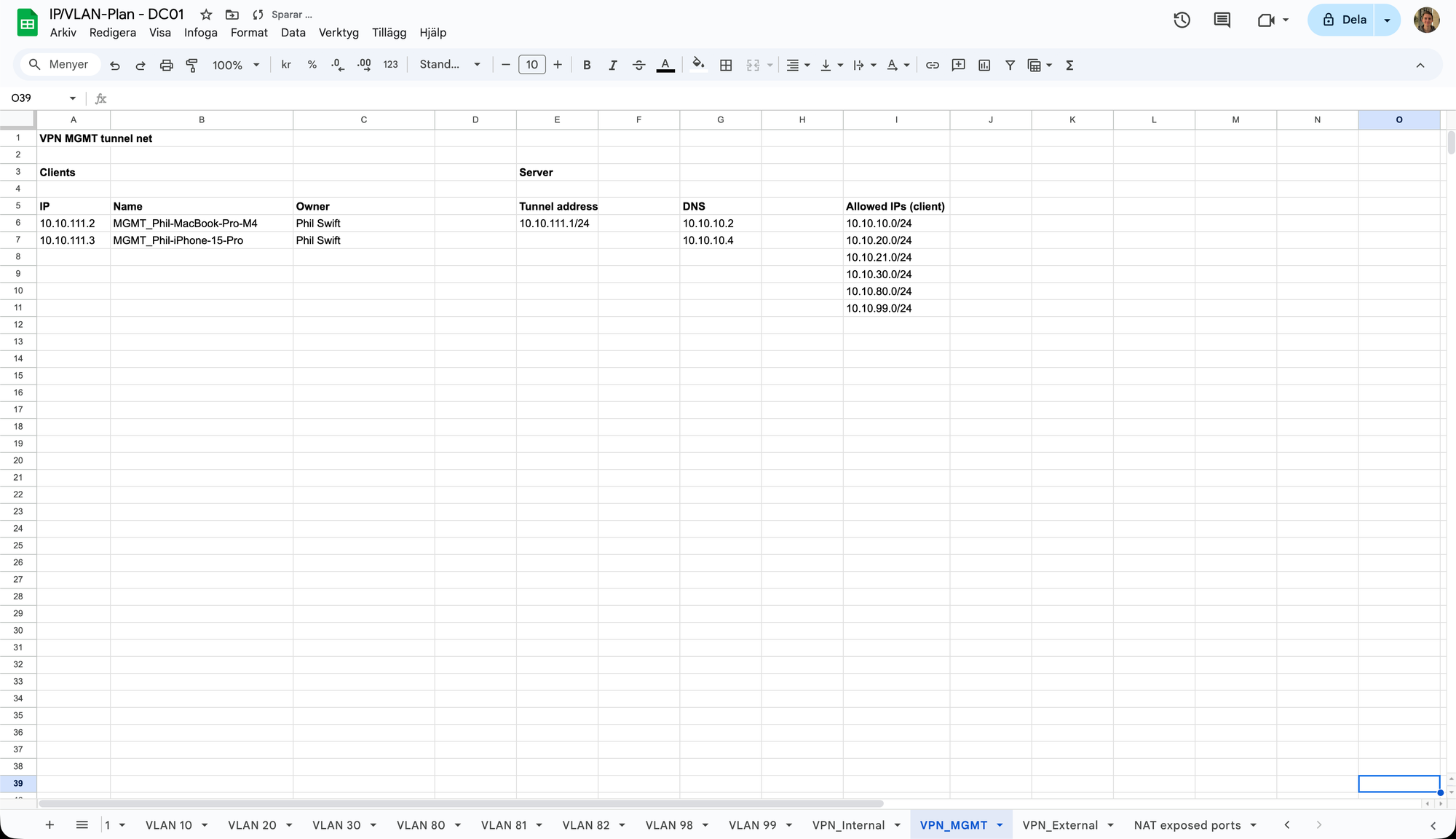
When running a VPN (WireGuard) instance, you usually create a "tunnel net". Shortly explained, it's a subnet where your clients (i.e., your laptop, phone etc.) are going to live, and you will then configure firewall rules to route from the tunnel net to the specific VLANs, depending on what access you want to give to what VPN instances. As you can see in the picture, the VPN instance "MGMT" has the tunnel IP address "10.10.111.1/24", it allows routing to the Core Services VLANs DNS servers and all the allowed IPs VLANs. Then, there's a brief list of all users with reserved IP addresses, the name of the peers (which should be descriptive of what user and device it belongs to) and all the owners of the devices. I usually go with three VPN instances; one for MGMT, one for "internal" users (that can access everything on the LAN and VLAN 20) and one for "external" users (which can access only an "external" logical subnet on VLAN 20). More about firewall rules and setting up a WireGuard VPN in OPNsense will be explained in future articles.
Lastly, we have the tab "NAT exposed ports".
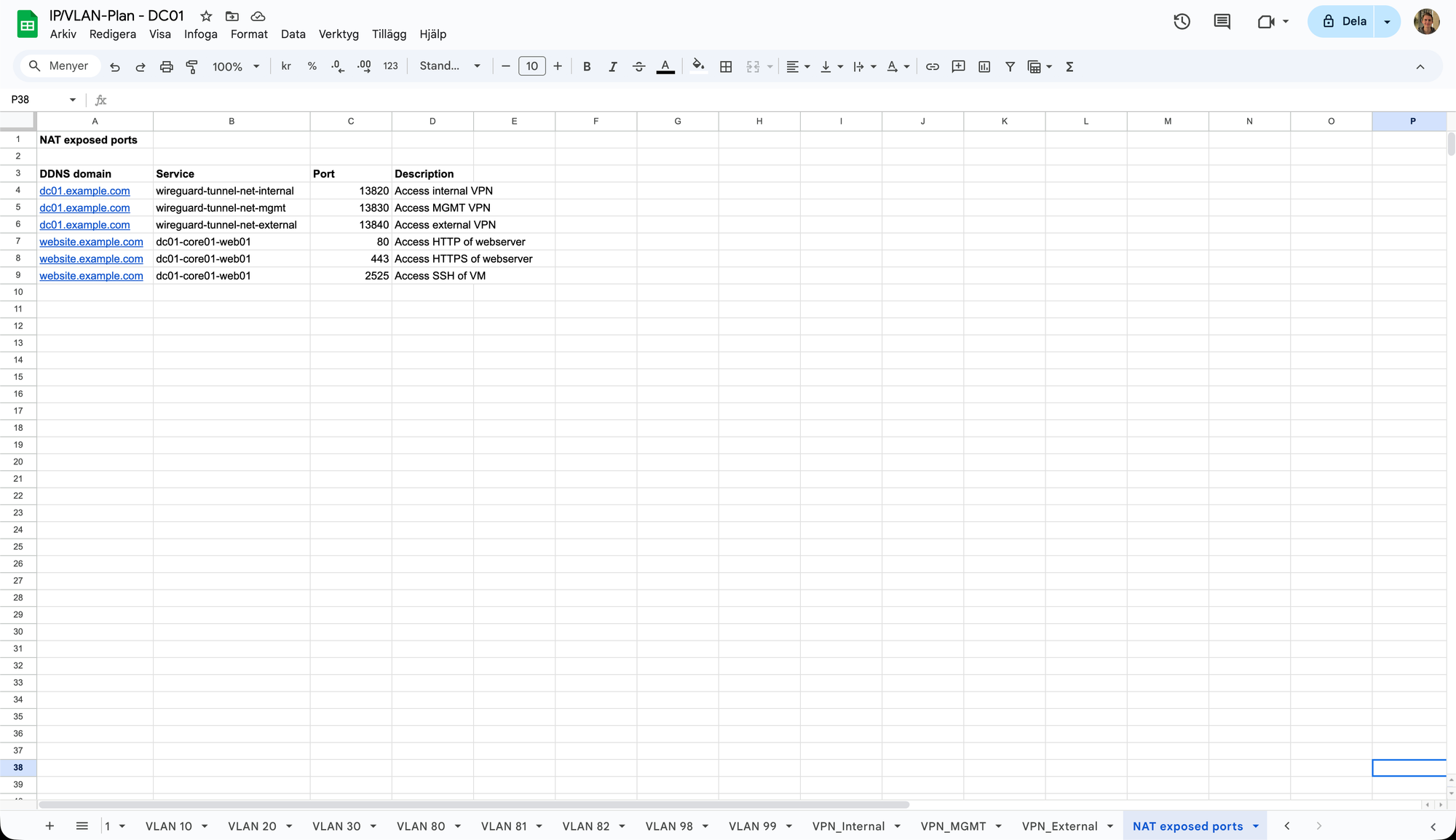
Here, I just simply list all of the ports that are exposed / port-forwarded through my OPNsense NAT. The list includes which domain name it's for (in this case, which DDNS domain name), which service and port it's exposing and a brief description of what the port-forward is used for. More on NAT and port forwarding in OPNsense will come in a future article.
This is how this example IP/VLAN-plan looks like right now. But, it's important to remember that it will change over time. Requirements will change, stuff (requiring new VLANs) will be added and some VLANs' functions may be deprecated and/or not needed anymore in the future and should therefore be removed to keep it clean. Just remember to document everything carefully and consistently, and if you need to do any changes in the future, plan carefully to keep the network clean, scalable and secure.
If you have any thoughts, ideas or improvements / corrections, please write them in the discussion section down below or send me a message on LinkedIn! I'm still pretty new when it comes to network architecture, so there's probably always something that can be done better or easier.
Thank you for reading! And remember, always keep your networks well-organised. :)